BetRupees OTP Not Received? What to Check Before Requesting Another Code
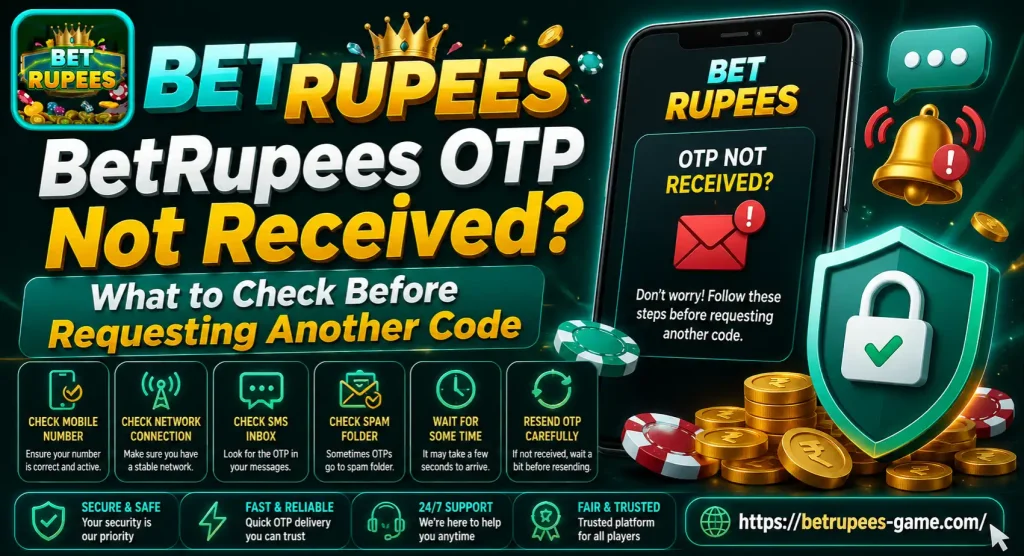
A BetRupees OTP not received problem can stop registration, login or password recovery. The code may be delayed because of a weak mobile signal, an incorrect number, blocked messages or several requests made within a short time.
Do not press the resend button repeatedly. Check your phone number and SIM connection first, then wait for the countdown on the verification screen to finish. When you request several codes, older OTPs may stop working and create more confusion.
Why Does BetRupees Ask for an OTP?
An OTP is a one-time password used to confirm that you control the phone number connected with an account. BetRupees OTP Not Received may request a verification code during:
- New account registration
- Login from a different device
- Password recovery
- Phone-number verification
- Account-security changes
- Certain payment actions
The exact verification process may change. Follow the instructions displayed on your current BetRupees screen rather than relying on an old screenshot or video.
Check the Phone Number Carefully
Start by reading the number entered on the verification screen. One missing or incorrect digit can send the OTP to another number or prevent delivery entirely.
If the form already displays Pakistan’s +92 country code, use the number format requested on that screen. Do not add the country code twice.
Also check whether you accidentally:
- Entered an old phone number
- Used another family member’s number
- Added an extra zero
- Left a space between digits
- Selected the wrong country code
- Typed the number linked to a different account
Use a SIM you own and can access. Registering with someone else’s number can create problems later when you need to recover your account.
The existing BetRupees game account setup article can help new users review the basic account-creation process.
Make Sure the SIM Is Active
The BetRupees app or website needs an internet connection to submit an OTP request, but the code normally arrives through the mobile network as an SMS.
Look at the signal bars on your phone. If there is little or no coverage, move to a location with a better signal before requesting another code.
You can also check the SIM by:
- Asking someone to send you a normal text message
- Making a short phone call
- Checking whether the SIM shows a network name
- Confirming that airplane mode is off
- Restarting your phone
If ordinary calls and messages are also not working, the issue may be with the SIM or mobile network rather than BetRupees OTP Not Received.
Check Blocked and Spam Messages
Some phones automatically filter messages from unknown numbers or short-code services. The OTP may have arrived without appearing in your main inbox.
Open your messaging app and look in sections named:
- Spam
- Blocked messages
- Unknown senders
- Archived messages
- Promotional messages
Also check whether a security app or SMS-filtering feature is blocking messages from unfamiliar senders. Review the settings carefully before changing anything.
Do not install a random messaging application just to receive the code. First use the SMS app already installed on your phone.
Check the Correct SIM on a Dual-SIM Phone
Many Android phones can hold two SIM cards. If you use a dual-SIM device, confirm which number is registered with BetRupees.
Open the phone settings and make sure that the correct SIM is:
- Enabled
- Connected to a mobile network
- Able to receive SMS messages
- Still using the registered number
Check both message inboxes if your phone separates SMS messages by SIM. An OTP sent to SIM 2 will not appear on another phone containing SIM 1.
Wait Before Requesting Another Code
An OTP is not always delivered immediately. Mobile-network congestion or a temporary verification delay can slow down the message.
Wait for the timer on the screen to finish. Do not close the page or keep pressing resend while the request is being processed.
Repeated requests can create several problems:
- Multiple OTP messages may arrive together
- An older code may expire
- The newest code may replace the previous one
- The resend option may become temporarily unavailable
- Too many attempts may trigger an account restriction
When a message arrives, check its time and use the most recent OTP.
Use Only the Latest OTP
Suppose you request one code, wait briefly and then request another. Both messages may eventually arrive, but the first code may no longer be valid.
Delete or ignore older OTP messages. Enter the newest code exactly as shown, without adding spaces or other characters.
If the code displays an invalid or expired message:
- Check that you used the latest OTP.
- Confirm that every digit was entered correctly.
- Make sure the verification page is still active.
- Avoid requesting another code immediately.
- Wait for the current resend timer to finish.
Do not keep trying the same expired code.
Check the Internet Connection
Although the OTP generally arrives through SMS, BetRupees still needs an internet connection to send the request and verify the code you enter.
Open another website to see whether your internet is working. If the page does not load, switch between Wi-Fi and mobile data.
You can also:
- Disable a VPN temporarily
- Close background downloads
- Turn airplane mode on briefly and then off
- Reopen BetRupees
- Restart the router if you are using Wi-Fi
A loading screen does not always mean the OTP request was submitted. Wait until BetRupees confirms that a code was sent.
Restart BetRupees and Your Phone
A temporary app or network problem may stop the verification screen from responding correctly.
Close BetRupees OTP Not Received completely instead of leaving it running in the background. Restart your phone, check the SIM signal and open the verification page again.
Enter the same correct number and request one fresh code. Use only the OTP generated after the restart.
Avoid uninstalling the app at this stage. Reinstallation may create an additional login issue if you do not remember your account details.
Clear Cache, Not Account Data
If the verification page remains stuck, Android users may try clearing the app cache.
The general path is:
- Open Settings
- Select Apps
- Find BetRupees
- Open Storage
- Tap Clear Cache
Menu names can differ by phone. Be careful not to select Clear Data or Clear Storage unless you know your login information, as this may sign you out and remove locally saved settings.
Try the Browser or Another Supported Access Method
If the BetRupees app does not submit the request, try the browser version if one is currently available. Use the same registered phone number and account details.
Do not create a second account because one verification attempt failed. First confirm whether the original account was created successfully.
Existing users can review the BetRupees login procedure before starting another registration. A separate BetRupees OTP Not Received login page is also available for standard account-access steps.
Check Whether You Still Control the Registered Number
For login recovery, the OTP is usually connected with the number already linked to the account. Entering a new number may not work.
If you changed your SIM or lost access to the registered number, repeatedly requesting an OTP will not solve the issue. Look for the account-recovery option or contact the verified platform support channel.
Be ready to explain that you no longer have access to the old number. Do not send identity documents to people contacting you through unofficial social-media accounts.
Is It a BetRupees OTP or Payment OTP?
An OTP requested during a deposit may come from your wallet, bank or payment service rather than BetRupees OTP Not Received.
Read the complete SMS before entering the code. It should tell you which action is being confirmed.
Never enter a payment OTP unless you personally started the transaction and recognize:
- The payment amount
- The service or merchant
- The approximate transaction time
- The action being approved
If you receive an unexpected payment OTP, do not share or use it. Check your financial account for unauthorized activity.
When Should You Contact Support?
Contact support after checking the number, SIM signal, blocked messages and resend timer, but the code still does not arrive. You should also seek help if every fresh OTP is rejected or you no longer control the registered SIM.
Prepare this information:
- Partly hidden phone number
- Whether the issue happened during registration, login or recovery
- Approximate request time
- Error message shown on the screen
- Phone model
- App or browser being used
- Safe screenshot without private codes
Explain the issue clearly, but never include your current OTP, password, payment PIN or complete banking information.
Keep Your BetRupees OTP Private
An OTP can approve account access or another sensitive action. Treat it like a temporary password.
Follow these safety rules:
- Never share an OTP through a phone call or chat
- Do not send it to someone claiming to be support
- Avoid entering codes on links received from strangers
- Read the SMS before using the code
- Reject any verification request you did not start
- Change your password if you notice unknown account activity
- Do not allow remote access to your phone
A person who asks for an OTP to “unlock” your account, bonus or withdrawal should not be trusted.
BetRupees OTP Not Received Final Thoughts
When a BetRupees OTP is not received, check the phone number, registered SIM, mobile signal and filtered messages before requesting another code. Wait for the existing request to finish and use only the latest OTP.
If the problem continues, contact support through a channel displayed by the platform and explain where verification stopped. Keep your password, OTP and payment information private throughout the process.
BetRupees involves real-money gaming and possible financial loss. It should only be used by adults aged 18 or above, and no game or promotion can guarantee earnings.